Browse help topics
Answer Taxably's questions
When the paperwork cannot settle something, Taxably asks you instead of guessing. Answer once and the answer is kept.
- Applies to
- Taxably Connect 3.3.9 and later
- Last reviewed
A document can say what it is. It cannot always say what it is for. When last year's return settles that, Taxably moves on without asking. When it does not, usually for a new client or one whose prior return is not in the folder, it asks you a specific question rather than making a confident guess.
The count of open questions is on the top bar, the bell, Home and the Review tab, and they always agree.
Answer a question
- Open Review. Questions are grouped in one card per client.
- Read the finding under the document's name, and the question in bold.
- To check the paper, press Open beside the document. It opens in Taxably's own reader.
- Press the answer that fits, or Add a note to say it in your own words.
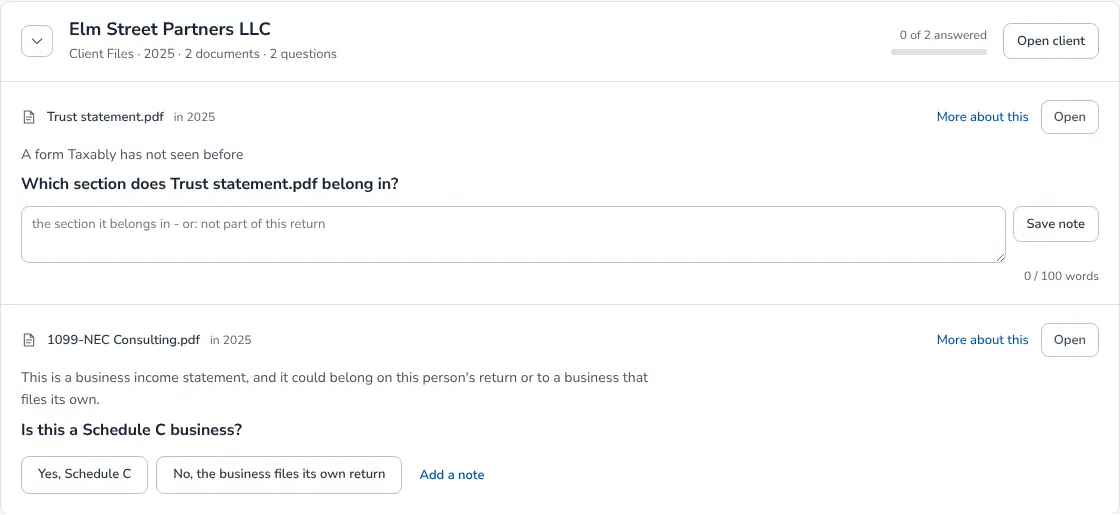
The filters at the top narrow the list by kind, such as Where it goes, Which tax year or A locked file, and the search box finds a client or a document.
What happens next
Your answer is kept with the document it was about. The next build reads it, and the same question is not asked again unless the evidence it was given under changes. Answers survive a restart and a rebuild.
On Manual, a client with open questions waits, and its sheet is built when you answer the last one. On Auto-pilot the sheet is built anyway and the same questions are printed at the end of it. See Manual or Auto-pilot.
Change an answer
Answered questions fold into the Answered section at the foot of the Review screen. Open it, find the question and choose a different answer. The next build follows the new one.
Related articles
- The kinds of questions, and what each answer doesEvery question Taxably asks names the document, what it found and why it is asking. Here is each kind, with what your answer changes.
- Manual or Auto-pilot, and when builds startTwo settings decide when sheets appear. Automation says what happens to a client with open questions; Building says when Taxably starts on its own.
- Read a prep sheetOne PDF per client per tax year, with every document the client sent, filed by section, the figures Taxably read, and what still needs you.
- Confirm folders Taxably is not sure aboutWhen a folder's name could be a person or a business, Taxably asks you before it prepares anything, with three answers to choose from.
Still stuck?
Email support@taxably.ai, or send your question from Help and support.