Browse help topics
When Taxably says something you didn't expect
The messages Taxably Connect shows, word for word, grouped by where you meet them, each with what it means and what to press.
- Applies to
- Taxably Connect 3.3.9 and later
- Last reviewed
On this page
Each message is quoted as Taxably shows it. Words in brackets, such as (client), stand for the name Taxably fills in. Where a message says to contact Taxably support, email support@taxably.ai with a summary from Settings, then About, Export a summary for support.
Things that look wrong but are fine
Waiting for documents to settle, builds (time)
Normal on Auto-pilot. The client's folder changed recently, so the sheet waits until it goes quiet. Press Build prep to build now instead.
No changes found since the last prep sheet
Nothing in the client's documents or answers changed, so the sheet you have is current and nothing was charged. To draw it again anyway, choose Rebuild from scratch in Build prep.
Taxably - Prep sheet status.pdf
A file in the client's Taxably Prep folder, there only while the sheet is out of date or being built. It goes away by itself once a current sheet is saved. Leave it in place.
(client)'s sheet is waiting on 2 documents Taxably has not reached yet
Nothing to fix. Those documents are read on the next run and the sheet builds then.
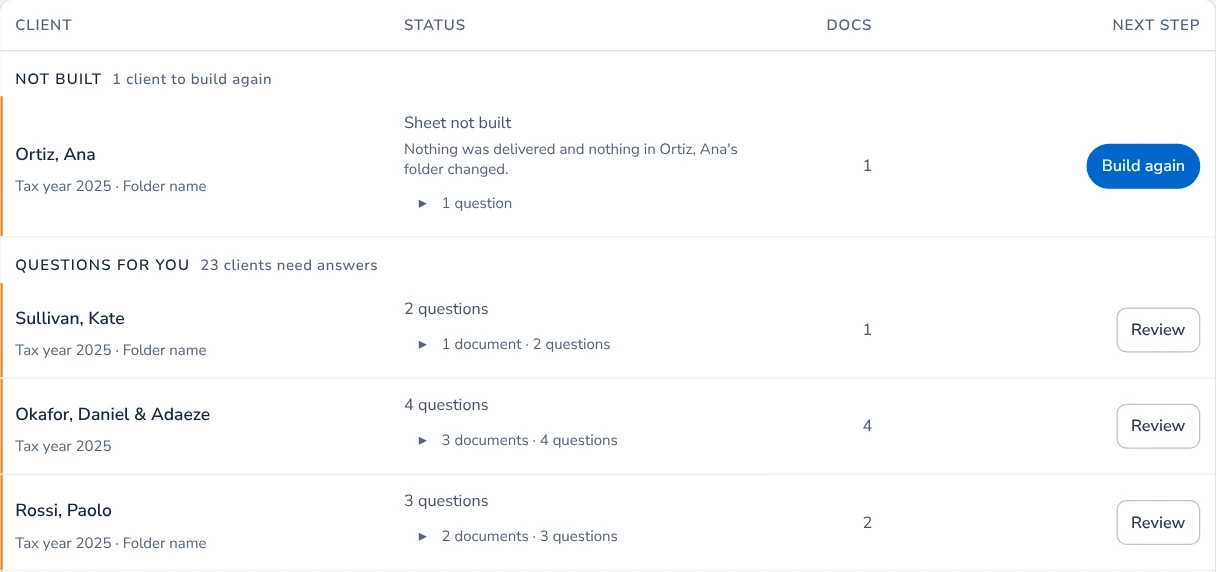
A client marked "Not built" is failed work: it has a reason and Build again. A question is different: it waits in Review for your answer.
unknown, which is not the same as zero
On the income reconciliation, a box nobody could read a figure from. The total says it is not complete rather than counting the box as zero. Check that box on the document.
Linking and account
Your firm already has a computer linked to Taxably, and Taxably links one computer per firm.
Unlink the other computer under Computers at app.taxably.ai/firm/devices, then link this one. See Unlink or change computers.
Only your firm's owner or an admin can link a computer to Taxably. Ask one of them to link this computer.
Ask the owner or an admin to sign in on this computer and link it.
There were too many linking attempts in a short time. Wait a few minutes, then try linking again.
Wait a few minutes, then press Sign in to Taxably again.
The browser could not reach your Taxably account. Check the internet connection, then try linking again.
Check that this computer can open app.taxably.ai, then link again.
Linking was not allowed in the browser, so this computer is not linked.
Someone pressed no in the browser. Start linking again and press Allow.
Your Taxably account could not link this computer just now. Try linking again, and contact Taxably support if it keeps happening.
Try once more. If it happens again, contact Taxably support.
This computer was unlinked from your Taxably account. Link it again to carry on.
Someone unlinked it, or the link lapsed after a long time offline. Open Settings, then Your Taxably account, and press Link this computer.
This computer is linked, but it has not been given permission to read yet. It asks your account again on its own.
Give it a few minutes. If reading stays off, unlink this computer and link it again.
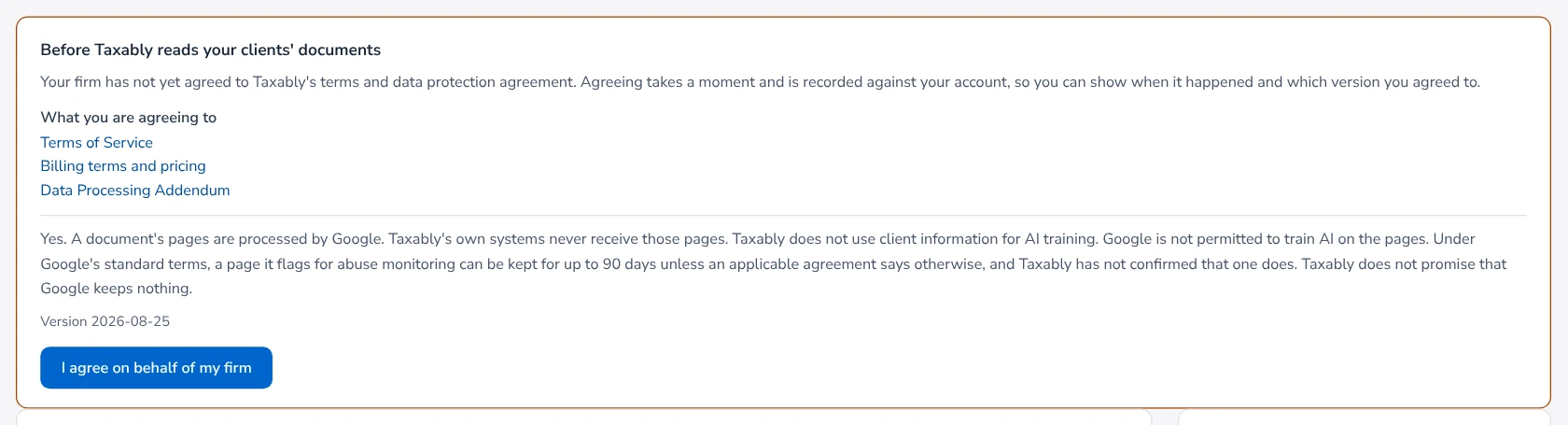
Before Taxably reads your clients' documents
Your firm has not agreed to the terms yet. Read the card and press I agree on behalf of my firm. Nothing is read until you do.
Your firm's last card payment to Taxably did not go through. Builds carry on for now.
Update the card at app.taxably.ai/firm/billing so builds are not paused.
Your firm's builds are paused because its card payment to Taxably did not go through.
Update the card at app.taxably.ai/firm/billing. This computer carries on where it stopped.
Your firm's builds are paused because its Taxably subscription has ended.
Check your firm's billing at app.taxably.ai/firm/billing.
This account has used the clients included with it. Add a payment method in your Taxably account, and this computer carries on where it stopped.
Add a card under Billing at app.taxably.ai.
Build prep won't start
This computer is not linked to your Taxably account, so nothing was started. Link it in Settings, then press Build prep again.
See Install Taxably Connect and link this computer.
Reading is paused for now. Nothing already built or saved is affected, and your builds start again when reading resumes.
Nothing to do. Your press is kept and builds by itself when reading resumes.
Taxably could not get permission to read just now, so nothing was started.
Check the connection, wait a few minutes, then press Build prep again.
This computer asked to read too many times in a short while. Wait a minute, then press Build prep again.
Wait a minute and press again.
Taxably could not confirm your account, so nothing was started.
Check the connection, or the account under Settings, then press Build prep again.
Folder still being listed
Taxably is still finding client folders there. Untick that folder's clients to build the others now, or wait for the listing to finish.
More than one connected folder has a client called (client). Open Build prep and choose the one to build.
Tick the client in the folder you mean, using the Connected folder column.
The client list changed. Open Build prep again.
Folders changed while the dialog was open. Close it, open Build prep again and confirm.
Preparation is already in progress. Let it finish, then check this selection again.
Wait for the current build, or press Stop, then press Check selection again.
That folder is already building, so this was not started. Press Build prep again when it finishes.
Press Build prep again once the current build ends.
This client's folder has no documents yet. Add the client's documents to the folder, then build again.
Add the documents, or untick the client and build the rest.
You pressed Stop before this started, so nothing was started. Open Build prep when you want it built.
Open Build prep and confirm again.
A client was held or skipped
Another computer at your firm is preparing this client's sheet
Another Taxably computer is building this client from the same shared folder. Let it finish; nothing is charged here. Press Build prep here afterwards if you want this one to build it.
A document in this client's folder changed after Taxably copied it, so this sheet was not delivered. Build again to include the change. Your previous sheet is still available.
Press Build again once the client stops saving files.
This client's folder could not be reached just before the sheet was saved, so it was not delivered.
Reconnect the drive or make the folder available, then press Build again.
Taxably can no longer find (client)'s folder where the run found it. It was moved, renamed or removed while the build ran.
Put the folder back, or wait until Connect lists it under its new name, then build again. Nothing was charged.
(client)'s sheet was still building when Taxably closed
Nothing is wrong. Press Build again; everything read so far is kept.
Taxably could not build (client)'s sheet
Press Build again. If it fails twice, contact Taxably support.
Taxably closed unexpectedly twice while building this client. It will not try again on its own.
Press Build prep for that client. If it happens again, contact Taxably support.
(client) is waiting on one question: which tax year each of its year folders holds. Answer it on the Review screen, then build its prep sheet.
Answer it in Review, then build.
Every document for this client is held, so there is nothing to prepare yet
Each file is over the size Taxably reads. Divide it with the Smart Splitter, then build.
Not building for now: you chose Don't build on this client
Press Build prep on that client when you want it built. New documents also bring it back.
Taxably has already built a prep sheet for a client with this name this tax year, from a different folder. Ask your Taxably support contact to confirm whether it is the same client.
Contact Taxably support so you are not charged twice for one client.
Earlier prep sheet found for (client)
The new sheet is ready. Its charge waits until Taxably support checks it against your account. Contact Taxably support.
Taxably cannot find what it needs to match your clients to the prep sheets it has already made on this computer, so nothing will be built until it is back.
Contact Taxably support. Do not reinstall or Reset first.
Questions in Review
Does your (2026) folder hold the (2025) tax year?
Your year folders look named for the filing year. Answer once for the whole connected folder; Taxably reads every client's folders that way.
(client) looks like a business, but its papers read like a personal 1040.
Choose Build the 1040 for a household, or Business only for a folder that is the business itself. To record who owns the business, use the Entity Connector.
This is a business income statement, and it could belong on this person's return or to a business that files its own.
Press Yes, Schedule C or No, the business files its own return.
We could not match the name or tax ID on this document to anyone on this return, so its amount is excluded from totals.
Answer whose it is: this client's, another client's, or not this client's. If it is a business's form, see the Entity Connector.
(file) is held: it has 1,240 pages, and Taxably reads documents of up to 400 pages. Split it into smaller files, or ask Taxably to raise the limit.
Divide it with the Smart Splitter. The client's other documents are read as usual.
Taxably found the same document twice in (client)'s folder and kept one, so nothing is counted twice.
If the two are really different documents, say so and both are kept.
Does (business) file its own return?
Last year's return names the business without saying. Yes adds its K-1 to what the client is asked for; no asks nothing more. See the Entity Connector.
Something on the sheet
This file was not processed because it did not pass Taxably's safety checks. Its contents are not included in this prep sheet. Request a new PDF from the sender.
Do not open the file. Ask the sender for a new PDF and save it in the client's folder.
This file is too large for Taxably to open safely
Ask the client to send it as a PDF.
This spreadsheet is larger than Taxably reads
Ask the client for the sheets that matter as a PDF, or split the workbook.
a HEIC photo, a kind of photo this version of Taxably does not open
Save the photo as a JPEG or PDF in the client's folder. The sheet says what to do for each kind of file. See A document could not be read.
The reading service could not be reached this build
Build again when the connection is back. Figures already on the sheet are from an earlier build.
Taxably could not finish reading it, so nothing from its pages is on this sheet
Build again; Taxably tries the document again. If it keeps happening, check that the file opens.
The figures Taxably read here do not match the page's own text - check the amounts against the document
Check those figures against the page before keying them. Each figure links to its page.
These figures do not add up to the total the document prints - check the amounts against the document
Check the box figures and the printed total on the document.
A shortcut in this client's folder was not followed
Taxably reads only documents in the client's own folder. Copy the real documents there.
Records and this computer
This copy of Taxably (version 3.3.8) is older than the one that last worked on your records (version 3.3.9), so it will not build
Install the current version from your Taxably account.
An older version of Taxably was opened on this computer after this one.
Build again with this version the prep sheets the older one made, and keep using this version.
Taxably's records are also being used from another computer, so nothing will be built here until they are used from one computer only.
Close Taxably on the other computer, then open it here again.
Taxably is getting its records ready after an update. It opens on its own when that is done, which can take a few minutes.
Wait. Do not open it a second time.
Taxably could not check (one of its records) right now because another program was using it
Close backup or virus-scanning programs reading your files, then press again. If it continues, contact Taxably support.
Part of this Taxably installation is missing, so Taxably could not save to your records. Nothing in them was changed. Reinstalling Taxably puts it back.
Reinstall Taxably Connect, then link this computer again.
Taxably cannot open its records under this Windows sign-in, so nothing will be built until it can.
Sign in to Windows as the person who set up Taxably. If that sign-in is gone, restore a recovery file into a new folder, or contact Taxably support.
Some of Taxably's records on this computer were saved by a newer version of Taxably.
Install the newest version from the download page in your Taxably account.
This computer holds another Taxably firm's client work, so nothing will be built or answered here until that is settled.
See Another firm's work on this computer.
These say to contact Taxably support, and nothing is changed while you wait:
- "Taxably cannot find what it needs to open its saved records on this computer…"
- "Taxably cannot find its records file on this computer, though a saved copy of it is here…"
- "Taxably cannot open some of its saved records on this computer…"
- "Another program changed Taxably's records while Taxably was updating how it keeps them…"
- "Taxably's records folder holds copies that a file-sharing service made…"
- "Taxably could not tell which version of Taxably saved some of its records…"
- "Taxably could not finish updating some of its records on this computer…"
Related articles
- When a sheet does not buildTaxably does not fail quietly. Here is where it tells you something went wrong, and what to do in the common cases.
- A document could not be readA document Taxably could not read is never left out quietly. The sheet names it and says what to do; here are the common cases.
- Unlink or change computersYour firm links one computer to Taxably at a time. Unlink the old one and link the new one; nothing is deleted from either.
- Contact supportEmail support@taxably.ai or send the form on the Help and support page. A summary from Taxably Connect helps us answer faster.
Still stuck?
Email support@taxably.ai, or send your question from Help and support.