Browse help topics
Connect your AI assistant
Let an AI assistant on the same computer, such as the Claude desktop app, answer questions about your built clients and suggest what to do next. Nothing changes until you approve it.
- Applies to
- Taxably Connect 3.3.9 and later
- Last reviewed
Ask "Which clients are still missing a K-1?" or "What did the Lees send in March?" and get an answer from what Taxably has read, without opening a single folder.
At least one client's prep sheet is built. The assistant only knows about clients whose sheet you built.
Connect an assistant on this computer
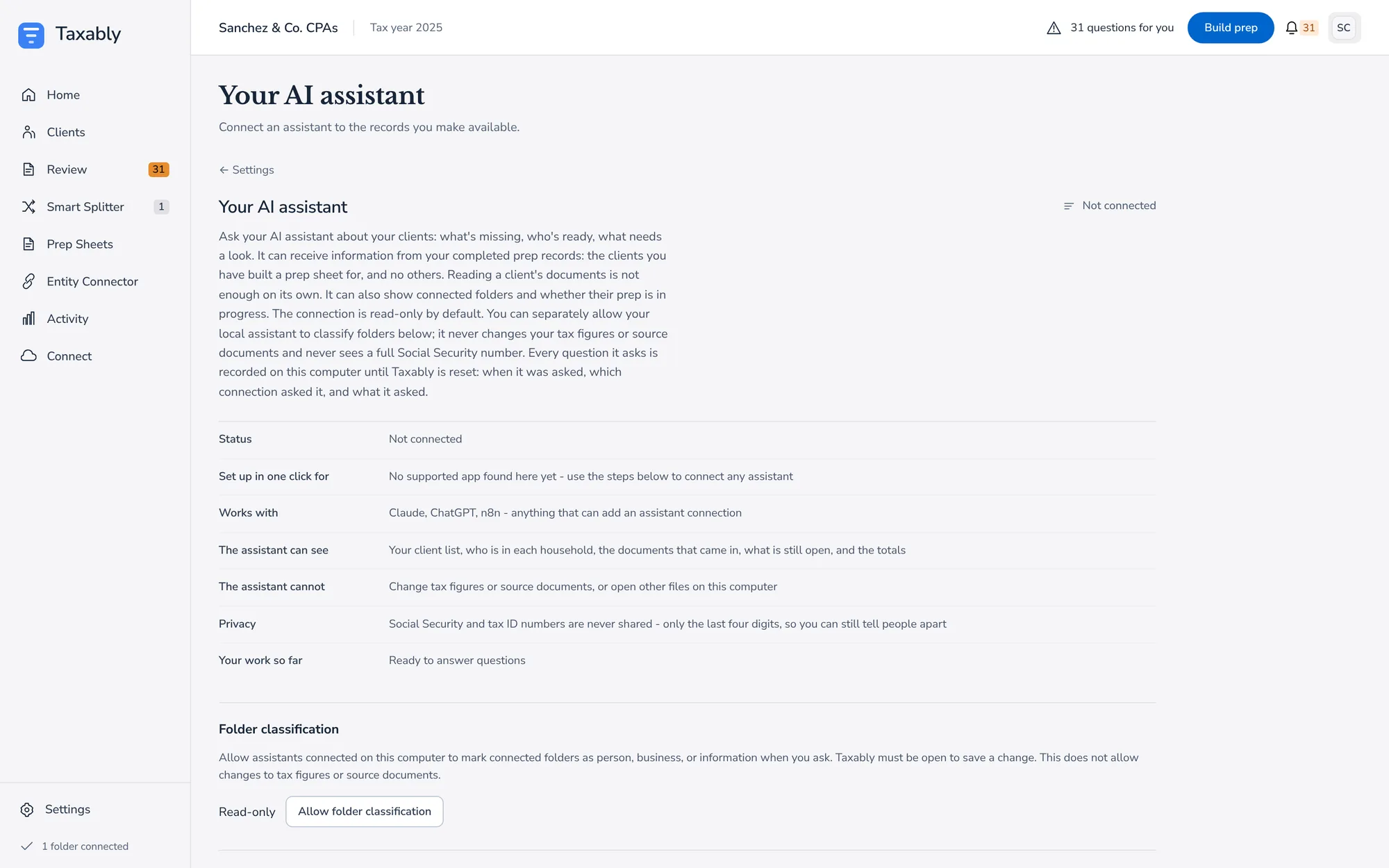
- In Taxably Connect, open Settings, then Your AI assistant.
- If the Claude desktop app is on this computer, press Connect to Claude Desktop. Taxably adds itself to Claude's list of tools.
- Restart the Claude desktop app.
- Ask Claude a question about a client you have built.
For another assistant that runs on this computer, follow the steps shown on the same screen. The assistant runs on the computer where Taxably Connect is installed, so there is no address to copy and nothing to add to your Taxably account. Claude starts the connection itself, so the Taxably window does not need to be open, but Taxably must stay installed. To stop it, press Disconnect on the same screen.
What it can and cannot see
- It sees your client list, who is in each household, the documents that came in, what is still open, and the totals.
- It sees only clients whose prep sheet you built. Reading a client's documents is not enough on its own.
- It never sees a full Social Security or tax ID number, only the last four digits.
- It cannot change tax figures or source documents, or open other files on this computer.
- Every question it asks is recorded on this computer until Taxably is reset.
What it can suggest
From Taxably Connect 3.3.10, it can suggest an answer to a question, a note, a link between a person and a business, a rebuild or an export. Each suggestion waits in Taxably, and nothing changes until you approve it there. You can separately allow it to mark folders as a person, a business or information when you ask it to, and remove that permission on the same screen.
Answers about a client can include the client's name, and what the assistant is told reaches the company that runs it, under that company's terms.
Related articles
- A tour of SettingsWhat each part of Settings does, and when you would change it. Most firms change one or two things and leave the rest as it starts.
- What leaves your computer, and what staysYour documents, records and prep sheets stay on your computer. Each document's pages go from there to the reading provider to be read, and our servers are not on that path.
- Your records on this computer, and ResetEvery build leaves a record of what Taxably read, kept on this computer. Reset starts Taxably over, and says what it removes and keeps before you press it.
- The Entity ConnectorThe Entity Connector records who owns which business among your clients, so a business's form that lands in an owner's folder is placed the right way. It is optional.
Still stuck?
Email support@taxably.ai, or send your question from Help and support.