Browse help topics
Confirm folders Taxably is not sure about
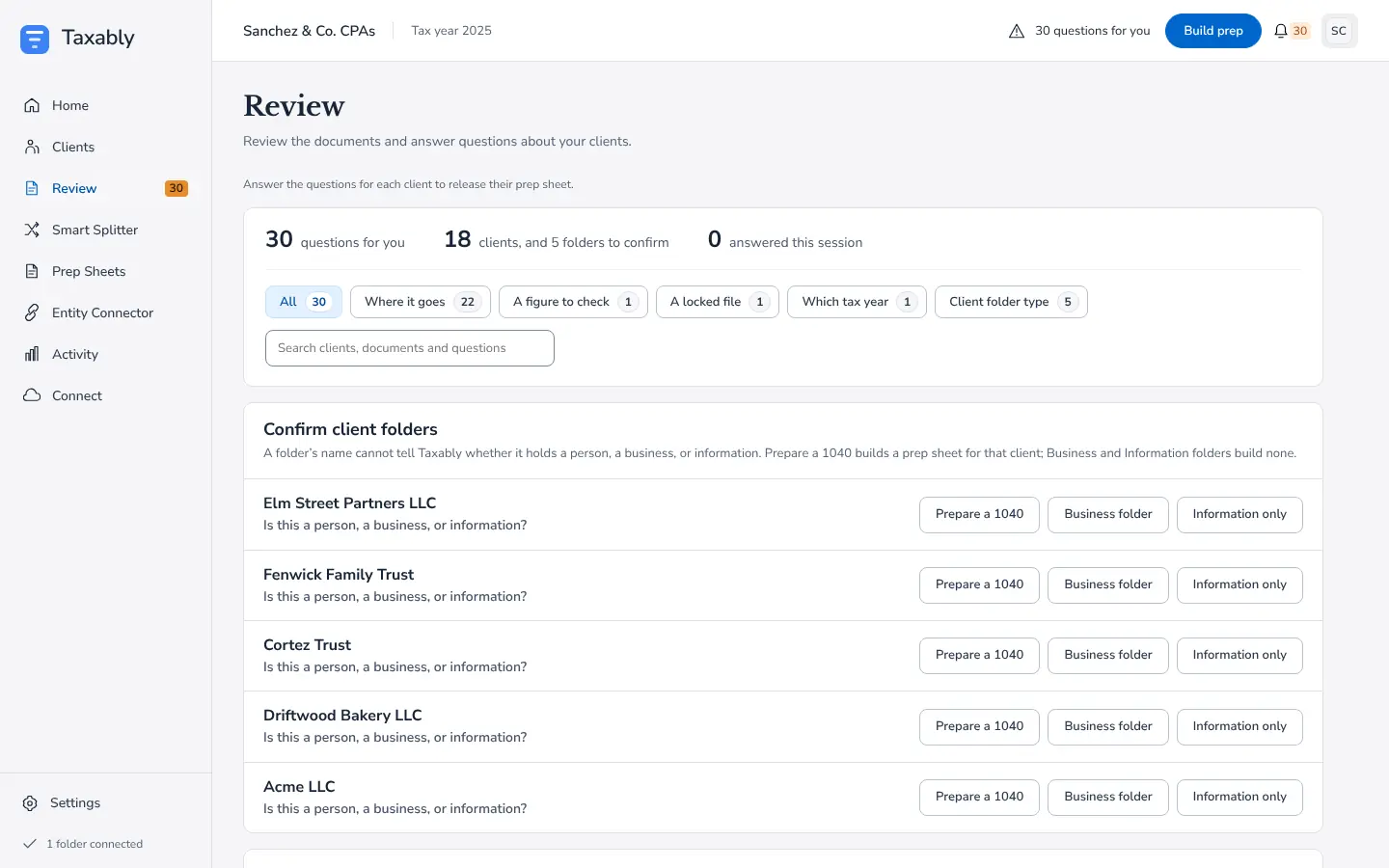
When a folder's name could be a person or a business, Taxably asks you before it prepares anything, with three answers to choose from.
- Applies to
- Taxably Connect 3.3.9 and later
- Last reviewed
On this page
A folder called "Bakery LLC" or "Smith Family Trust" might hold a person's return, or it might not. Taxably does not guess from a name. It lists those folders on the Review screen, in the Confirm client folders card, and waits for you.
Answer the card
- Open Review. The Confirm client folders card sits above the questions about clients.
- For each folder, press the answer that fits:
- Prepare a 1040: a person or household whose return you prepare. Taxably builds a prep sheet for it.
- Business folder: a business the firm keeps papers for. No prep sheet.
- Information only: reference papers, templates or anything else. No prep sheet.
- Taxably keeps your answer and does not ask about that folder again.
What each answer does
A folder you mark as a person is built like any other client and charged like any other client. Business and information folders get no prep sheet and no charge, and still give Taxably context about the clients around them.
Related articles
- Connect your client foldersPoint Taxably at the folder that already holds your clients. Nothing moves, nothing is read and nothing is charged.
- The kinds of questions, and what each answer doesEvery question Taxably asks names the document, what it found and why it is asking. Here is each kind, with what your answer changes.
- The Entity ConnectorThe Entity Connector records who owns which business among your clients, so a business's form that lands in an owner's folder is placed the right way. It is optional.
- Pricing, and how builds are chargedYou pay for the clients you build, once per client per tax year, and Build prep shows what a build adds to your bill before anything is read.
Still stuck?
Email support@taxably.ai, or send your question from Help and support.